top of page

🕹️ CHECKPOINT —  Game UI/UX Insights 

🕹️ FEED PAGE —  Game UI/UX Insights 

🕹️ CHECKPOINT —  Game UI/UX Insights 

🕹️ FEED PAGE —  Game UI/UX Insights 

Warp
Warp

Updated: Apr 25

A Knight of the Seven Kingdoms Game UI/UX Design

Share Post

Barbara Franco

·

1 day ago

· Apr 23 · 3 min read

·

1 min read

Barbara Franco

·

Apr 23

1 day ago

Portfolio home—bold “Game UI/UX Designer • Barbara Franco,” CRT-style blue portrait, and Start/Gallery/Contact/Blog buttons.

This project started as a UI challenge piece for Beyond the HUD, but after the first version I knew I wanted to push it further and turn it into a proper portfolio case study.

I chose A Knight of the Seven Kingdoms because I loved the tone of the show and wanted to explore how that atmosphere could translate into a game character screen. The main goal was to create something that felt believable for this world while still staying clear and readable as game UI.


1. Project Goal


The goal of this project was to design a character status / equipment screen that:

  • feels grounded in the world of A Knight of the Seven Kingdoms

  • presents character information clearly

  • supports equipment readability at a glance

  • balances atmosphere with usability

  • works as a small system, not just a single mockup

From early on, I also wanted the structure to support more than one character, so even though Duncan came first, the screen had to be flexible enough to later expand into Egg’s version too.


2. Final Duncan Screen


Duncan was the foundation for the whole system, so his screen naturally became the place where most of the visual language was defined.

I wanted his version to feel sturdy, recognizable, and a little rough around the edges, just like the character himself. His heraldry, shield, and armor details helped a lot here, because they gave me very specific visual anchors to make the UI feel like part of the serie.


Portfolio home—bold “Game UI/UX Designer • Barbara Franco,” CRT-style blue portrait, and Start/Gallery/Contact/Blog buttons.


3. Expanding the System with Egg


Once Duncan’s screen felt more stable, I moved on to Egg’s screen. He is quieter, lighter, and much less defined by armor or combat gear, so his screen needed to feel softer while still belonging to the same interface family.

The changes were not just visual. I also adjusted the categories and status language to fit him better.


Portfolio home—bold “Game UI/UX Designer • Barbara Franco,” CRT-style blue portrait, and Start/Gallery/Contact/Blog buttons.


4. Visual Direction


I wanted the UI to feel tied to Duncan himself, so his gear and heraldry became the main anchors for the interface language. That helped the screen feel more specific and less like a generic medieval menu.

I also tried to avoid an overly polished finish. Rougher surfaces and material contrast helped the UI stay closer to the tone of the show without losing clarity.

Portfolio home—bold “Game UI/UX Designer • Barbara Franco,” CRT-style blue portrait, and Start/Gallery/Contact/Blog buttons.


5. Process and Iteration


The project started from an earlier wireframe structure that I adapted to fit Duncan and later Egg. The main layout idea was already there from the start:

  • centered character

  • equipment slots around the body

  • status and attributes on the right

  • top navigation to suggest a larger game system


What evolved later was mostly the visual language, not the structure itself.


Portfolio home—bold “Game UI/UX Designer • Barbara Franco,” CRT-style blue portrait, and Start/Gallery/Contact/Blog buttons.
UX Exploration
Portfolio home—bold “Game UI/UX Designer • Barbara Franco,” CRT-style blue portrait, and Start/Gallery/Contact/Blog buttons.

Portfolio home—bold “Game UI/UX Designer • Barbara Franco,” CRT-style blue portrait, and Start/Gallery/Contact/Blog buttons.

Portfolio home—bold “Game UI/UX Designer • Barbara Franco,” CRT-style blue portrait, and Start/Gallery/Contact/Blog buttons.


6. References


The main references for this project were:

  • Divinity: Original Sin 2

  • Baldur’s Gate 3

  • Assassin’s Creed Valhalla

  • UXzavr Dark Fantasy Study


I looked at them mainly for layout, grouping, top navigation, parchment treatment, and darker material handling. The idea was not to copy one specific screen, but to study how they balance character presentation with surrounding information.


Portfolio home—bold “Game UI/UX Designer • Barbara Franco,” CRT-style blue portrait, and Start/Gallery/Contact/Blog buttons.


7. Final Thoughts


This project was mainly about balancing atmosphere and readability.

I wanted the UI to feel like it belonged to the world of the show, while still functioning clearly as a character screen. Revisiting the first version helped me tighten the equipment presentation, improve feedback, and expand the concept into a more complete system with Duncan and Egg.

There are still details I may refine later, but this version already feels much stronger in terms of cohesion, clarity, and character differentiation.


8. Extra


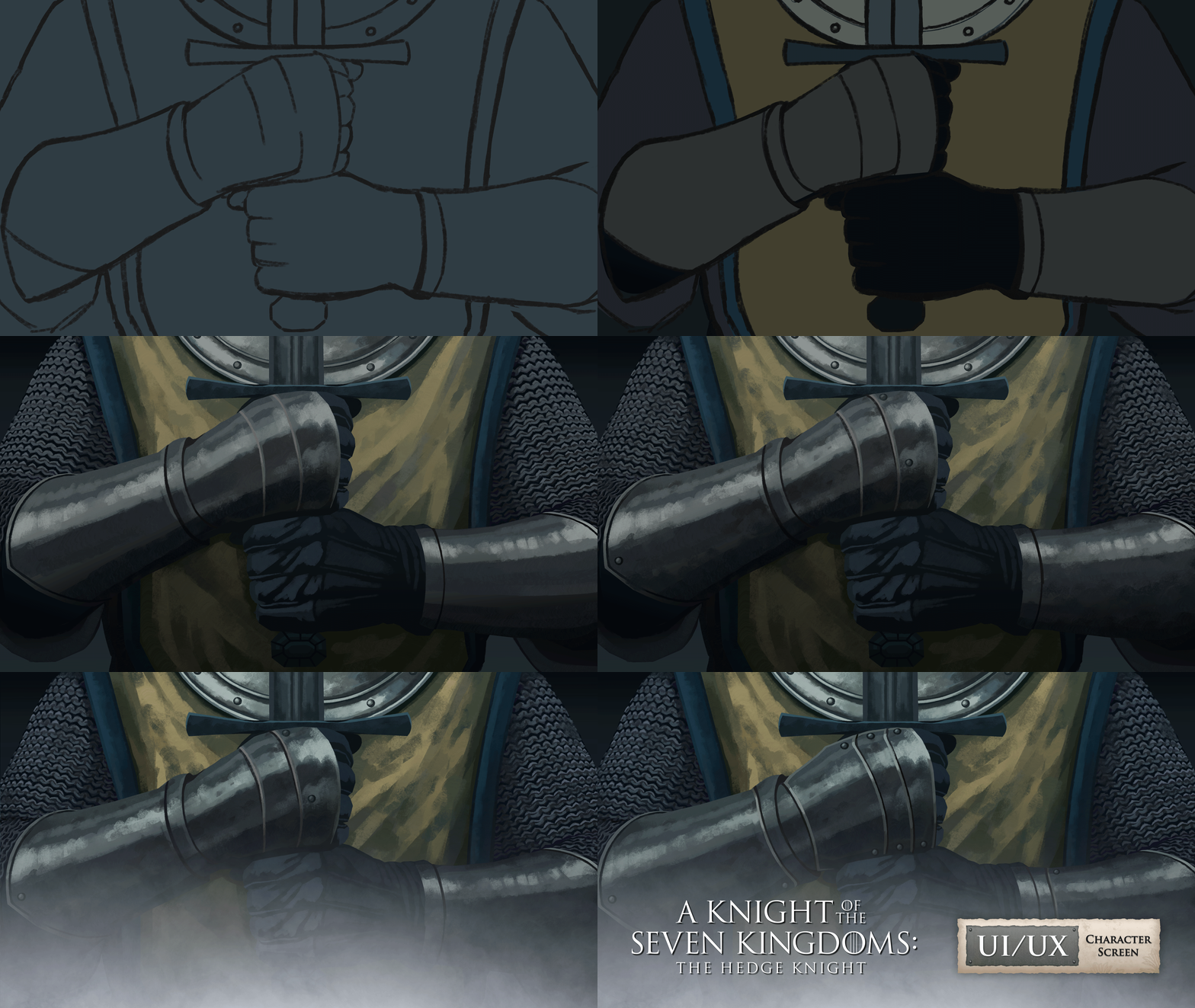
Just a quick GIF showing part of the painting process behind the cover. I usually think its best to use another artist’s work so the full attention stays on the UI, but in this case I couldn’t find the material I wanted, so I ended up painting everything myself.


Portfolio home—bold “Game UI/UX Designer • Barbara Franco,” CRT-style blue portrait, and Start/Gallery/Contact/Blog buttons.


9. Credits


  • Ornaments: Studio2am

  • Textures: Texturelabs

  • Chainmail brush (asset): 123FreeBrushes

  • Background: Doosan

  • Targaryen Shield: Demonic Guard

  • Targaryen Symbol: Noun Project


Disclaimer: Unofficial fan-made project for portfolio use only. All rights to A Knight of the Seven Kingdoms and its related IP belong to their respective owners.


Back to GALLERY

0

102

views

0

comments

Copied!

UI/UX Design

·

Art

·

Tech

·

Art

Recent Posts

18

0

118

🎮 Case Study (Part 1): Designing My Own Game-Inspired Portfolio

Minecraft Inventory UI/UX Redesign – A Modern Approach

Minecraft Inventory UI/UX Redesign – A Modern Approach

Illustrated blog thumbnail: game-UI desk with blueprint labeled ‘BUTTON’, a wireframe sheet, a UI chest panel, chat bubble, and charts.

2

0

699

🎮 Case Study (Part 1): Designing My Own Game-Inspired Portfolio

🍽️ RPG UI/UX System Design – Delicious in Dungeon (WIP)

🍽️ RPG UI/UX System Design – Delicious in Dungeon (WIP)

Illustrated blog thumbnail: game-UI desk with blueprint labeled ‘BUTTON’, a wireframe sheet, a UI chest panel, chat bubble, and charts.

18

0

53

🎮 Case Study (Part 1): Designing My Own Game-Inspired Portfolio

🎬 Case Study (Part 5): Evolving the Art Direction for a Cinematic Hero

🎬 Case Study (Part 5): Evolving the Art Direction for a Cinematic Hero

Illustrated blog thumbnail: game-UI desk with blueprint labeled ‘BUTTON’, a wireframe sheet, a UI chest panel, chat bubble, and charts.

Minecraft Inventory UI/UX Redesign – A Modern Approach

Illustrated blog thumbnail: game-UI desk with blueprint labeled ‘BUTTON’, a wireframe sheet, a UI chest panel, chat bubble, and charts.

🍽️ RPG UI/UX System Design – Delicious in Dungeon (WIP)

Illustrated blog thumbnail: game-UI desk with blueprint labeled ‘BUTTON’, a wireframe sheet, a UI chest panel, chat bubble, and charts.
Comments

Share Your ThoughtsBe the first to write a comment.

A Knight of the Seven Kingdoms Game UI/UX Design

  • Writer: Barbara Franco
    Barbara Franco
  • Apr 22
  • 3 min read

Updated: Apr 25

Portfolio home—bold “Game UI/UX Designer • Barbara Franco,” CRT-style blue portrait, and Start/Gallery/Contact/Blog buttons.

This project started as a UI challenge piece for Beyond the HUD, but after the first version I knew I wanted to push it further and turn it into a proper portfolio case study.

I chose A Knight of the Seven Kingdoms because I loved the tone of the show and wanted to explore how that atmosphere could translate into a game character screen. The main goal was to create something that felt believable for this world while still staying clear and readable as game UI.


1. Project Goal


The goal of this project was to design a character status / equipment screen that:

  • feels grounded in the world of A Knight of the Seven Kingdoms

  • presents character information clearly

  • supports equipment readability at a glance

  • balances atmosphere with usability

  • works as a small system, not just a single mockup

From early on, I also wanted the structure to support more than one character, so even though Duncan came first, the screen had to be flexible enough to later expand into Egg’s version too.


2. Final Duncan Screen


Duncan was the foundation for the whole system, so his screen naturally became the place where most of the visual language was defined.

I wanted his version to feel sturdy, recognizable, and a little rough around the edges, just like the character himself. His heraldry, shield, and armor details helped a lot here, because they gave me very specific visual anchors to make the UI feel like part of the serie.


Portfolio home—bold “Game UI/UX Designer • Barbara Franco,” CRT-style blue portrait, and Start/Gallery/Contact/Blog buttons.


3. Expanding the System with Egg


Once Duncan’s screen felt more stable, I moved on to Egg’s screen. He is quieter, lighter, and much less defined by armor or combat gear, so his screen needed to feel softer while still belonging to the same interface family.

The changes were not just visual. I also adjusted the categories and status language to fit him better.


Portfolio home—bold “Game UI/UX Designer • Barbara Franco,” CRT-style blue portrait, and Start/Gallery/Contact/Blog buttons.


4. Visual Direction


I wanted the UI to feel tied to Duncan himself, so his gear and heraldry became the main anchors for the interface language. That helped the screen feel more specific and less like a generic medieval menu.

I also tried to avoid an overly polished finish. Rougher surfaces and material contrast helped the UI stay closer to the tone of the show without losing clarity.

Portfolio home—bold “Game UI/UX Designer • Barbara Franco,” CRT-style blue portrait, and Start/Gallery/Contact/Blog buttons.


5. Process and Iteration


The project started from an earlier wireframe structure that I adapted to fit Duncan and later Egg. The main layout idea was already there from the start:

  • centered character

  • equipment slots around the body

  • status and attributes on the right

  • top navigation to suggest a larger game system


What evolved later was mostly the visual language, not the structure itself.


Portfolio home—bold “Game UI/UX Designer • Barbara Franco,” CRT-style blue portrait, and Start/Gallery/Contact/Blog buttons.
UX Exploration
Portfolio home—bold “Game UI/UX Designer • Barbara Franco,” CRT-style blue portrait, and Start/Gallery/Contact/Blog buttons.

Portfolio home—bold “Game UI/UX Designer • Barbara Franco,” CRT-style blue portrait, and Start/Gallery/Contact/Blog buttons.

Portfolio home—bold “Game UI/UX Designer • Barbara Franco,” CRT-style blue portrait, and Start/Gallery/Contact/Blog buttons.


6. References


The main references for this project were:

  • Divinity: Original Sin 2

  • Baldur’s Gate 3

  • Assassin’s Creed Valhalla

  • UXzavr Dark Fantasy Study


I looked at them mainly for layout, grouping, top navigation, parchment treatment, and darker material handling. The idea was not to copy one specific screen, but to study how they balance character presentation with surrounding information.


Portfolio home—bold “Game UI/UX Designer • Barbara Franco,” CRT-style blue portrait, and Start/Gallery/Contact/Blog buttons.


7. Final Thoughts


This project was mainly about balancing atmosphere and readability.

I wanted the UI to feel like it belonged to the world of the show, while still functioning clearly as a character screen. Revisiting the first version helped me tighten the equipment presentation, improve feedback, and expand the concept into a more complete system with Duncan and Egg.

There are still details I may refine later, but this version already feels much stronger in terms of cohesion, clarity, and character differentiation.


8. Extra


Just a quick GIF showing part of the painting process behind the cover. I usually think its best to use another artist’s work so the full attention stays on the UI, but in this case I couldn’t find the material I wanted, so I ended up painting everything myself.

Portfolio home—bold “Game UI/UX Designer • Barbara Franco,” CRT-style blue portrait, and Start/Gallery/Contact/Blog buttons.


9. Credits


  • Ornaments: Studio2am

  • Textures: Texturelabs

  • Chainmail brush (asset): 123FreeBrushes

  • Background: Doosan

  • Targaryen Shield: Demonic Guard

  • Targaryen Symbol: Noun Project


Disclaimer: Unofficial fan-made project for portfolio use only. All rights to A Knight of the Seven Kingdoms and its related IP belong to their respective owners.


Comments


© 2025 by Barbara Franco

bottom of page